Transform Your Book Marketing with KDP Book Mockup Canva Frames
For self-publishing authors, the challenge often isn't writing the book—it's creating a compelling visual to sell it. You need a professional-looking advertisement that stops the scroll on Amazon, Instagram, or Facebook, but hiring a photographer or mastering complex 3D software isn't always feasible. This is where KDP Book Mockup Canva Frames changes the game. It's a practical, drag-and-drop template system designed specifically for authors who need realistic book advertising images quickly and affordably.
What Exactly Are These Canva Frames?
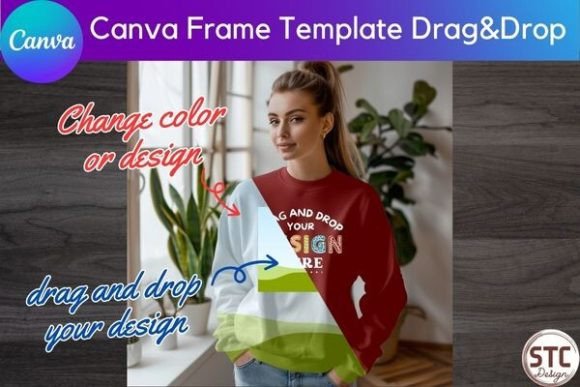
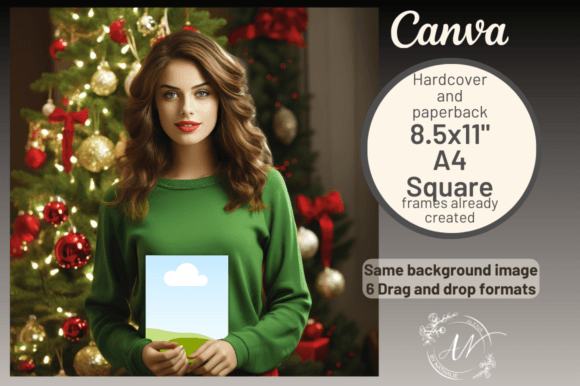
Imagine a pre-designed scene where a pair of hands is holding a book, ready for your cover. The core of this product is a high-resolution image with a transparent placeholder for your book cover. The hands, the background, and the book itself are all separate, importable elements within a Canva template. You simply upload your book cover image, drag it into the designated frame, and Canva automatically fits it into the scene with correct perspective, lighting, and shadow. The result is a photorealistic mockup that looks like you staged a professional photoshoot.
The visual style is clean, modern, and focused on realism. The hands are natural, the shadows are soft and believable, and the overall aesthetic is designed to highlight your book cover without distracting elements. It’s a style that works for both contemporary fiction and business non-fiction, avoiding trendy filters that might date quickly. The personality is professional yet approachable—exactly what you need to build trust with potential readers browsing online.
Where This Mockup System Truly Shines
The real value of KDP Book Mockup Canva Frames is its versatility across different publishing niches and marketing channels. If you create low-content books—like journals, planners, coloring books, or children's activity books—this tool is invaluable. The templates include layouts for square books, A4 sizes, and standard 8.5x11" paperbacks, covering most common KDP trim sizes. You can create a mockup for a gratitude journal, a sketchbook, or a children's picture book in minutes.
For high-content authors, the application is equally powerful. Use the mockups to create:
- Amazon A+ Content: These are the enhanced images on your book's product page. A professional mockup here significantly increases conversion rates compared to a flat cover image.
- Social Media Graphics: Create eye-catching posts for Instagram, TikTok, Facebook, and Pinterest. A 3D-looking book in someone's hands performs better than a 2D cover.
- Website Banners and Newsletter Headers: Give your author website or email campaign a polished, professional look.
- Advertising Campaigns: Use the images in Facebook Ads or Amazon Marketing Services ads to grab attention.
The mockup acts as a design asset that enhances your brand identity as an author. Consistent, professional visuals across all platforms build recognition and credibility, which is crucial in a crowded market.
Practical Guidance for Using Your Frames
Getting started is straightforward, but a few tips will ensure the best results. First, always use a high-resolution image of your book cover. A blurry or pixelated cover will ruin the illusion of realism. When you import your cover into the Canva frame, pay attention to the lighting. The mockup scene has a specific light direction; your cover should ideally match that. Most premade book covers are designed with a neutral light source, so they adapt well.
Next, consider your overall design composition. The mockup is a display font for your book cover—it's meant to showcase it, not compete with it. Avoid adding too many extra elements, text overlays, or busy backgrounds. Let the realistic image do the work. If you’re creating a series, use the same mockup style for all books to build visual consistency, which is a key principle of strong brand identity.
Think about font pairing in the context of your marketing text. If you add a headline or call-to-action to your mockup image, choose a creative font that complements your book's genre. For a thriller, a bold sans serif font might work. For a romance, a delicate script font could be appropriate. The mockup provides the professional visual foundation; your typography choices on top of it should be intentional.
Evaluating Fit and Maximizing Impact
Before using any design asset, it’s smart to evaluate its fit for your project. Does the hand style match the tone of your book? A feminine, manicured hand holding a business book might feel off, just as a rugged hand holding a delicate poetry collection might. The KDP Book Mockup Canva Frames offers a neutral, versatile hand style that works across many genres, but it's worth considering.
Test the mockup with your specific cover. Does your title remain readable? Does the important artwork on the front cover get obscured by the fingers? Sometimes, a slight repositioning within the Canva frame is needed. The beauty of the system is that you can adjust the scale and position of your cover layer easily.
Finally, remember the licensing. These templates are typically for personal and commercial use, meaning you can use the final images you create to market and sell your books. However, you cannot resell the raw template files themselves. This is standard for commercial font and asset licenses, and it’s important to respect the creator's terms.
In the end, KDP Book Mockup Canva Frames isn't just a template; it's a practical solution to a common problem. It saves time, reduces cost, and elevates the professionalism of your book marketing. By providing a realistic, customizable visual, it helps bridge the gap between your manuscript and a reader's decision to click "Buy Now." For any author serious about their publishing business, it’s a tool worth having in your creative toolkit.