Watercolor Splash Canva Frame Effect_B: Elevate Your Digital Designs
In the world of digital design, texture and emotion are everything. Flat, sterile graphics often fail to capture attention in a crowded online space. This is where the Watercolor Splash Canva Frame Effect_B comes into play. It is not merely a static image; it is a dynamic, editable design asset created specifically for Canva users. If you are looking to infuse your projects with an artistic, hand-painted aesthetic without the mess of actual paints, this digital template offers a sophisticated solution. It bridges the gap between traditional artistry and modern web design efficiency.
Understanding the Asset: More Than Just a Frame
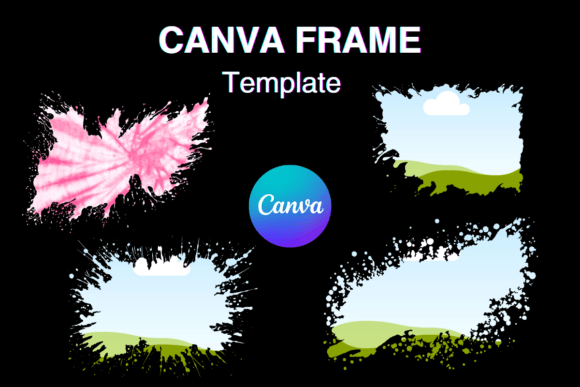
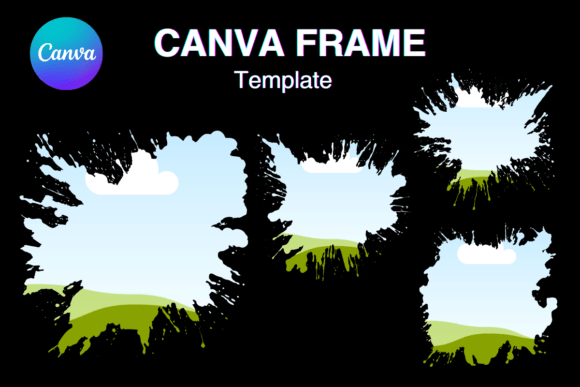
First, it is crucial to understand exactly what you are receiving. This product is a digital file, specifically a PDF that contains a link to four custom-made Canva templates. You will not receive a physical prop or a static PNG or SVG file. Instead, you get an editable Canva frame template. This distinction is vital for your workflow. Because the files are structured as templates, you maintain full control over the composition. The dimensions are set at 12 x 12 inches (3600 x 3600 pixels), which is a standard high-resolution size suitable for print design and large-scale digital displays.
The visual personality of the Watercolor Splash Canva Frame Effect_B is defined by its fluidity and organic nature. Unlike rigid geometric borders, this frame features the unpredictable beauty of watercolor bleeds and pigment splashes. It carries a sense of movement and creativity. The aesthetic is soft yet vibrant, making it a versatile tool for various creative niches. Whether you are a photographer, a small business owner, or a hobbyist crafter, the organic nature of this frame adds a layer of authenticity that digital-only graphics often lack. It mimics the feel of real paper and wet paint, providing a tactile quality to your screen-based projects.
Practical Applications for Creatives and Entrepreneurs
The true value of a design asset lies in its utility. The Watercolor Splash Canva Frame Effect_B shines in its adaptability across different media. For social media graphics, these frames act as powerful visual anchors. Imagine using them to highlight customer testimonials on Instagram or to frame a product feature on Facebook. The watercolor effect draws the eye inward, focusing the viewer's attention on the text or image you place inside the frame.
For those involved in editorial design or publishing, this template offers a quick way to create chapter headings or pull quotes in digital magazines and e-books. The artistic flair prevents text-heavy pages from looking monotonous. Furthermore, because the template allows for easy drag-and-drop editing, you can adjust the intensity of the colors to match your specific brand identity. If your brand palette is pastel, you can lighten the splashes; if it is bold, you can deepen the hues.
Here are a few specific scenarios where this asset excels:
- Digital Planners and Stickers: Crafters can use the frame to create custom stickers that stand out in digital planners.
- Logo Design Accents: While the frame itself isn't a logo, the watercolor texture can be used behind a logotype to create a badge or emblem effect.
- Packaging Design: For small businesses selling handmade goods, these frames can be printed on hang tags or box inserts to reinforce the artisanal quality of the product.
- Website Headers: A subtle watercolor frame can soften the look of a website header, making it feel more inviting and less corporate.
Technical Flexibility and Workflow Integration
One of the most significant advantages of the Watercolor Splash Canva Frame Effect_B is its technical setup. The description notes that it features a transparent layer and is optimized for vinyl sublimation. This is a game-changer for print-on-demand businesses. If you are creating physical products like mugs, t-shirts, or tote bags, the transparency allows the background color of your product to show through the "white" areas of the watercolor, creating a seamless integration with the material.
Moreover, the 3600 x 3600 pixel resolution ensures that your work remains crisp even when scaled. The instruction that sizes are "approximate and can be sized up or down" speaks to the flexibility of the vector-like nature of the Canva elements. You do not need to be a Photoshop expert to use this. The easy drag & drop functionality within Canva means that you can have a professional-looking design ready in minutes. This efficiency is invaluable for marketers and content creators who need to produce high volumes of visual content without sacrificing quality.
Enhancing Brand Perception Through Texture
In brand strategy, consistency and emotion drive recognition. Using a recurring design element like the Watercolor Splash Canva Frame Effect_B across your platforms creates a cohesive visual language. It signals to your audience that you value aesthetics and creativity. When a potential customer sees a consistent use of high-quality, artistic frames, it subconsciously elevates the perceived value of your brand. It suggests that you pay attention to details.
However, it is important to exercise restraint. Because the watercolor effect is quite expressive, it works best when paired with clean, legible typography. If you were to use a script font or a handwritten font inside the frame, ensure it is highly readable. Often, a clean sans serif font provides a beautiful contrast to the organic, flowing nature of the watercolor splash. This contrast creates a clear visual hierarchy, ensuring your message is understood while the frame adds the desired emotional weight.
Final Thoughts on Usability
It is worth reiterating that this is a Canva template, not a standalone image file. This means you need an active Canva account (free or Pro) to utilize the link provided in the PDF. Once you access the template, you can duplicate it, modify it, and save it as part of your own design library.
Whether you are designing a wedding invitation, a sale announcement for your e-commerce store, or a digital art print, the Watercolor Splash Canva Frame Effect_B provides a professional foundation. It combines the charm of mixed-media art with the practicality of modern design assets. By incorporating this into your toolkit, you gain the ability to produce visually compelling work that resonates with a human touch, all while maintaining the speed required in today’s digital landscape.