Master Your Time with the Ultimate 2024-2025 Monthly Planner Canva Template
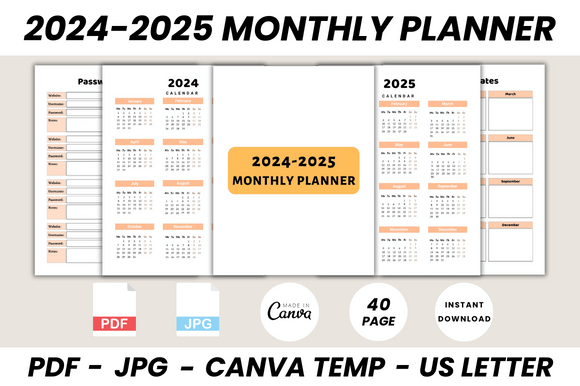
Staying organized across two full years requires more than just a basic calendar. It demands a system that is both comprehensive and adaptable, a central hub for your schedules, contacts, and long-term goals. The 2024-2025 Monthly Planner Canva Template is designed to be that central hub. This isn't a simple collection of date grids; it's a complete organizational toolkit built within Canva, offering a cohesive and professional aesthetic that you can personalize to match your brand or personal style. With 40 meticulously prepared pages, it provides the structure you need while giving you the creative freedom to make it your own.
A Complete Visual and Functional Toolkit
The strength of this planner template lies in its thoughtful blend of form and function. Visually, it presents a clean, modern typography style that prioritizes clarity. The layout is spacious, using a balanced grid system that prevents overcrowding, which is essential for a tool you'll interact with daily. The design personality is one of quiet confidence—it’s professional enough for a business owner tracking projects and launches, yet personal enough for an individual mapping out family birthdays and vacation plans. The overall appeal is its versatility; it acts as a neutral yet stylish canvas.
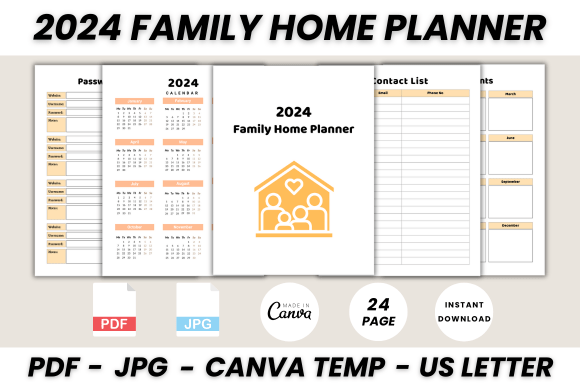
Functionally, the package is exhaustive. Beyond the month-by-month spreads for both 2024 and 2025, it includes critical support pages that transform it from a planner into a life management system. You’ll find dedicated sections for:
- Yearly Overviews: Full 2024 and 2025 calendars for high-level planning.
- Essential Trackers: A Password Tracker, Important Dates page, Birthday Tracker, and Wish List.
- Professional Tools: A Contact List and a dedicated SCHEDULE page for weekly or project-based planning.
- Personalization: A "Belongs To" page and a final "Thank You" note, adding a personal touch.
- Creative Space: Ample Notes pages for brainstorming, journaling, or meeting minutes.
Where This Planner Template Excels
The applications for the 2024-2025 Monthly Planner Canva Template extend far beyond personal use. Its structured yet editable nature makes it a powerful design asset for a variety of professionals and projects.
For entrepreneurs and small business owners, it serves as an editorial planning calendar, content scheduler, and client meeting tracker all in one. The consistent visual framework reinforces a sense of professionalism and operational control. Marketers and bloggers can use it to plan content campaigns, track social media graphics schedules, and note important industry dates, ensuring their output is strategic and consistent.
Designers and creative professionals will appreciate it as a project management tool. It can help track freelance client deadlines, invoice dates, and project milestones. The template’s clean visual hierarchy ensures that at a glance, you can distinguish between a personal appointment and a project deadline, enhancing readability and reducing cognitive load. Even for personal use, it’s ideal for coordinating family schedules, planning events, or managing a side hustle.
Customizing Your Planner in Canva
This is where the template truly shines, leveraging Canva’s accessible platform. Editing is straightforward with a free Canva account. You can adjust every element to create a planner that feels uniquely yours, which is key to building a tool you’ll actually use.
Start by personalizing the brand identity elements. Swap out the placeholder logo on the "Belongs To" page for your own. Change the color palette to align with your personal or business brand identity. Canva’s font library allows you to modify the typeface choices—perhaps you prefer a more traditional serif font for headings or a friendly sans serif font for body text to improve on-screen readability.
Consider the font pairing. The template likely uses a complementary pair, but you can experiment. A common and effective strategy is pairing a distinctive display font for the month headers with a highly legible sans serif font for the dates and notes. This creates a clear visual hierarchy. For a more personal touch, you might incorporate a script font or handwritten font for specific labels or the "Belongs To" section, adding personality without sacrificing the overall modern typography structure.
Remember, the goal is to enhance audience engagement—in this case, your own. A planner that reflects your aesthetic is one you’re more likely to open and use consistently, which is the entire point of planning. Test your color and font changes to ensure the calendar grids remain clear and the contact list is easy to scan. The template’s solid foundation means your customizations will layer on top of a professional layout style, ensuring the end result is both beautiful and functional for the two years ahead.