Tote Bag Mockup Canva Template: A Designer's Guide
As a designer or entrepreneur, you know the power of a great presentation. A stunning design can fall flat if it's not shown in a real-world context. This is where a high-quality mockup becomes your most valuable asset. The Tote Bag Mockup Canva Template is a specific tool designed to solve this problem, offering a realistic, customizable canvas for your artwork, logos, and patterns. It’s not just a static image; it's an editable system built for modern creators who use Canva as their primary design platform.
Understanding the Visual Appeal and Style
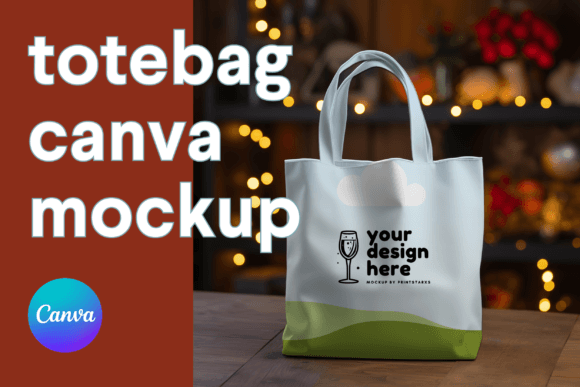
The core of this offering is a white tote bag mockup with a clean, minimalist aesthetic. The bag itself is rendered with realistic fabric texture, subtle shadows, and natural creases that give it dimension and life. This isn't a flat, cartoonish illustration. The visual personality is one of professional versatility—it can feel casual and eco-friendly, sleek and corporate, or artistic and boutique, depending entirely on the design you place on it. The style is contemporary and photorealistic, making it suitable for high-end brand presentations, social media content, and client pitches where authenticity matters.
The appeal lies in its adaptability. A graphic designer can use it to showcase a logo for a client's new merchandise line. A small business owner can visualize their packaging design before ordering a physical batch. A content creator can produce consistent, branded imagery for their blog or Instagram without a photoshoot. The mockup acts as a neutral, high-quality stage that elevates whatever you place upon it.
Practical Applications Across Creative Projects
Where does a Tote Bag Mockup Canva Template like this work best? Its applications span a wide range of professional and personal projects. For brand identity and logo design, it provides a tangible context. Showing a logo on a tote bag instantly communicates a brand's potential for physical merchandise, which is crucial for pitches and portfolio pieces.
In packaging design and editorial design, it serves as a realistic mockup for product shots in lookbooks, website hero images, or magazine features. For web design and social media graphics, the high-resolution files (4096x4096px) ensure your visuals are crisp on any screen. The transparent PNG background is particularly useful here, allowing you to place the bag onto any background or pattern you create, ensuring brand consistency across your digital presence.
For crafters, hobbyists, and small business owners, it’s a practical design asset for creating product listings, promotional materials, and email marketing content. Instead of describing a future product, you can show it. This builds customer confidence and engagement. The editable Canva template link means you can create multiple variations—changing the bag color or pattern—directly in your browser, without needing advanced software like Photoshop.
How This Mockup Influences Your Brand Presentation
Using a professional mockup directly influences key aspects of your presentation. It enhances readability and visual hierarchy by placing your core design element—the bag—in a realistic environment, allowing viewers to focus on the artwork itself. The clean, white background of the default mockup ensures your design is the star.
For brand perception and professionalism, the difference is significant. A custom-designed mockup signals that you pay attention to detail and value quality. It moves your work from the realm of digital concepts into the physical world, which builds recognition and trust. Audiences engage more with content that feels authentic and polished. Seeing a design on a tangible object like a tote bag makes it more relatable and desirable than seeing it as a flat graphic on a screen.
The consistency it offers is another major benefit. You can use the same mockup style across all your product visuals—t-shirts, mugs, posters—creating a cohesive look for your portfolio or online store. This consistency strengthens your brand identity and makes your work instantly recognizable.
Choosing and Using This Mockup Effectively
Evaluating if this Tote Bag Mockup Canva Template fits your project is straightforward. If you need to present a design on a product, especially one with a flat surface like a bag, and you work within Canva, it’s a strong match. Consider the included styles: the high-resolution JPG and PNG files cover most use cases, from print to digital. The Canva link is the standout feature for those who want live editing capabilities.
For font pairing and typography, the mockup itself is neutral, but it pairs well with a wide range of typefaces. A bold display font for a headline on the bag can work with a clean sans serif font for body text in your accompanying marketing materials. If your brand uses a script font or handwritten font, the tote bag's surface can showcase its character beautifully. The key is to ensure the typography on the bag is legible at the scale you present it.
When testing, use your actual design assets. Place your logo, pattern, or illustration onto the bag. Does the scale look right? Do the colors interact well with the white bag and any shadows? The editable Canva template allows you to adjust the bag color, which is a powerful feature for testing different brand color schemes quickly.
From a practical standpoint, the commercial font and licensing aspects are handled digitally. As a digital download, you receive the files directly. Always review the license for any digital asset to ensure it covers your intended use, whether for personal projects, client work, or commercial products. This mockup is a premium font-style asset—a high-quality design asset intended to save you time and elevate your output.
In your workflow, use it early. When brainstorming packaging design or merchandise ideas, mock them up instantly. Use the visuals in client presentations to get approval before production. Create social media content to tease a new product launch. The goal is to leverage this tool not just for final presentation, but throughout the creative process to make better, more informed decisions. It’s a practical piece of modern typography application—where the typeface is the design, and the mockup is its stage.