Streamline Your Workflow: The Ultimate To Do List Bundle
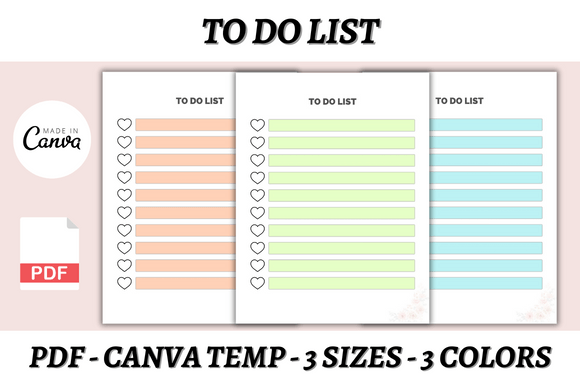
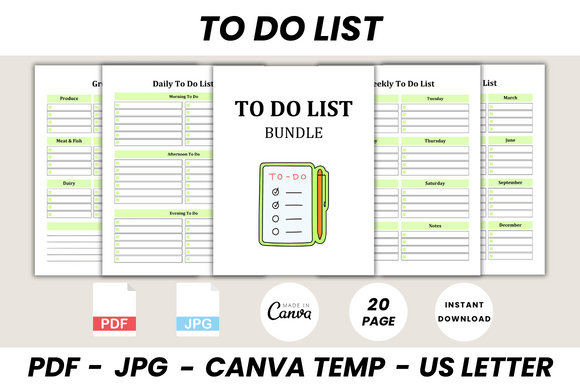
In the world of productivity and design, organization is often the bridge between a chaotic idea and a polished final product. For the modern creative—whether you are a small business owner juggling client work, a content creator managing an editorial calendar, or a crafter organizing supplies—visual organization matters. This is where the To Do List Bundle Canva Template comes into play. It is not merely a collection of checkboxes; it is a comprehensive system designed to bring order to the visual noise of daily life. With 20 distinct printable pages, this bundle offers a structured yet flexible approach to planning that fits seamlessly into both digital and physical workflows.
Visual Aesthetics and Functional Design
The true value of a good planning tool lies in its ability to be both beautiful and functional. The To Do List Bundle Canva Template embodies a clean, modern aesthetic that avoids the clutter often found in traditional planners. The visual style is characterized by clear typography and ample white space, which is crucial for readability. When you open the file in Canva, you will notice the deliberate use of hierarchy—headings are distinct from body text, guiding the eye naturally from the title to the specific tasks at hand.
Because this is a Canva-based system, the design is inherently modern. It leverages the power of editable files, meaning the visual personality is completely in your hands. Do you prefer a sans serif look for a minimalist, corporate feel? You can adjust the font settings instantly. Do you want to inject some personality with a handwritten font for a more artisanal brand vibe? The template allows for that too. This flexibility ensures that the template doesn't just look like a generic download; it becomes a true extension of your personal or corporate brand identity.
Comprehensive Utility: From Groceries to Goals
One of the standout features of this bundle is its sheer scope. It goes beyond a simple daily scheduler. The inclusion of specific categories makes it a versatile design asset for various aspects of life and business. The bundle includes:
- Daily, Weekly, and Yearly Overviews: Essential for editorial design and content planning, allowing you to zoom in on immediate tasks or zoom out to long-term goals.
- Grocery and Checklist Pages: Perfect for household management or inventory checks for small businesses.
- Notes and "Belongs To" Pages: These are vital for branding. The "Belongs To" page is particularly useful if you are creating a physical printable product to sell or gift, adding a professional touch to the presentation.
The design supports a visual hierarchy that makes scanning information effortless. Whether you are using the Grocery List for a quick shop or the Yearly To Do List for strategic planning, the layout ensures that the most important information stands out. This is the essence of good graphic design—it serves the user's immediate need without requiring them to decipher the layout.
Customization and Brand Consistency
For entrepreneurs and marketers, consistency is key to building a recognizable brand. The To Do List Bundle Canva Template serves as a blank canvas for your brand identity. Because the files are fully editable, you can align the planner with your specific color palette and typeface choices.
Consider how this impacts your workflow if you are a designer or publisher. You can use these templates as part of a larger packaging design system. For instance, if you sell a physical product, you could customize the checklist to serve as an instruction manual or a care guide included with the item. The ability to resize the US Letter dimensions within Canva means you are not restricted to standard paper sizes; you can adapt the graphics for social media graphics, creating Instagram stories that share your "To Do" progress with your audience, or resize them for A5 planners.
The customization extends to the logo design placement. You can easily drop your own mark onto the pages, turning a simple organizational tool into a piece of branded collateral. This is particularly useful for content creators who want to share their planning process as part of their content strategy, ensuring that even their internal tools look polished on camera.
Practical Application and Typography Considerations
When utilizing the To Do List Bundle Canva Template, it is helpful to think about the font pairing principles that underpin good design. The template structure supports a mix of styles. You might choose a bold display font for the headers to grab attention and a highly legible serif font or sans serif font for the list items to ensure comfortable reading during long planning sessions.
While the bundle does not come with a specific premium font installed (relying instead on Canva's library), this is actually a strength. It allows you to use fonts you have already curated for your brand. If your brand uses a specific script font for accents, you can apply it to the headers without worrying about licensing issues, provided you are using fonts available within Canva's licensed library or your own uploads.
From a usability standpoint, the templates encourage a logical flow. The Notes pages (8 different variations are included) are designed with subtle grid lines or ample spacing, facilitating both bullet journaling and longer-form note-taking. This adaptability makes the bundle suitable for web design wireframing notes, marketing campaign brainstorming, or simple daily journaling.
Integration into Modern Workflows
The modern creative professional often operates in a hybrid environment—part digital, part analog. This bundle bridges that gap. By offering JPG files alongside the editable Canva link, the kit acknowledges that sometimes you need a static image for a quick print, while other times you need an editable layer for complex customization.
For crafters and hobbyists, the "Belongs To" page offers a charming way to personalize gifts or organize personal libraries. For small business owners, the structured lists help manage the "invisible" work of administration—tasks that don't generate revenue but keep the business running. Using a cohesive set of templates for these tasks reduces cognitive load. You aren't reinventing the wheel every time you need to make a list; you are simply opening a familiar, well-designed tool.
Ultimately, the To Do List Bundle Canva Template