Skulls Canva Frames: Elevate Your Halloween Decor
There’s a specific challenge in Halloween design that many of us face: how to create something that feels genuinely spooky and stylish without resorting to the same clip-art bats and cartoonish pumpkins everyone else uses. You want atmosphere. You want a touch of darkness that feels intentional, curated, and even elegant. This is precisely where a strong design asset becomes invaluable, moving your projects from generic to memorable.
More Than Just a Template: Understanding the Aesthetic
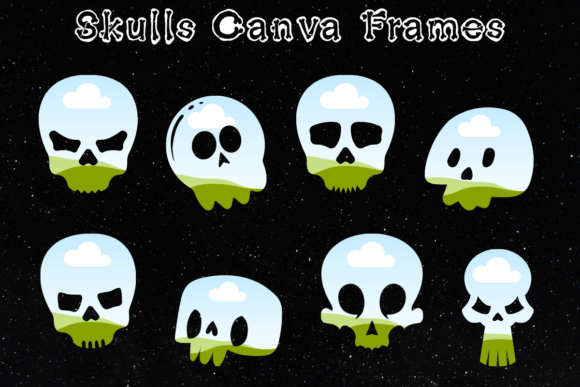
Let’s be clear about what you’re working with here. The Skulls Canva Frames collection isn’t a single-use graphic. It’s a set of 16 distinct design frameworks built within Canva, each centered around skull motifs. The visual personality here leans into macabre elegance. Think intricate line work, aged textures, and compositions that balance the iconic skull symbol with negative space and sophisticated layout principles. This isn’t Halloween as a cartoon; it’s Halloween as a mood, a brand, an atmosphere.
The strength of this collection lies in its versatility as a design asset. Because you’re working within Canva’s environment, these frames become a starting point for your own creativity. They are not static images you simply download and print. They are dynamic templates. You have full control to upload your own photographs, swap in custom textures or patterns, adjust colors to match your brand palette, and manipulate the layers. This transforms them from a simple graphic into a powerful creative font for your visual storytelling, allowing for endless iteration and personalization.
Practical Applications: Where These Frames Truly Shine
The real value of any design tool is measured by its utility across different projects. These Skulls Canva Frames have a surprisingly broad range of applications, making them a practical investment for a wide array of creators.
For Brand Identity and Marketing
For a small business in the craft, beverage, or entertainment space—think a craft brewery, a tattoo parlor, a specialty candle maker, or an event promoter—these frames offer a shortcut to a compelling seasonal brand identity. Use them to create a cohesive suite of social media graphics for an October campaign. Design a series of Instagram Stories, Facebook covers, or Pinterest pins that all share the same sophisticated, eerie aesthetic. The frames help establish immediate visual recognition and a professional consistency that elevates your brand perception during the Halloween season. They can act as a temporary but powerful display font for your visual hierarchy, instantly communicating the theme.
For Digital and Print Projects
Beyond social media, think about the tangible. Entrepreneurs and crafters can use these frames to design product packaging for limited-edition Halloween items. A label for a “Graveyard Shift” coffee blend or a sleeve for a “Skull & Roses” soap bar suddenly gains immense character. For event planners and hosts, these are perfect for creating custom invitations, digital flyers, or even signage for a Halloween party. The process is straightforward: click the access link in your provided PDF, open the template in Canva, and start designing. You can produce professional-grade editorial design for a seasonal blog or newsletter, or design unique merchandise like posters, stickers, or apparel graphics that stand out in a crowded market.
For Personal and Hobbyist Use
Don’t underestimate the power for personal projects. Bloggers and content creators can use these frames to design standout featured images for their Halloween-themed articles or video thumbnails. Hobbyists can create custom desktop or phone wallpapers, printable art for their home decor, or even design the cover for a personal scrapbook or journal. The ability to use a free Canva account makes this accessible to everyone, removing the barrier of expensive software. You’re not just buying images; you’re gaining access to a creative system.
Making the Most of Your Design Assets
Integrating any new asset into your workflow requires a bit of thoughtful application. Here’s how to approach these frames to get the best results.
First, consider font pairing and typography within the frames. While the frames provide the visual structure, the text you add is critical. For a cohesive look, pair the ornate, detailed style of the skulls with clean, modern sans serif font choices for body text. For headlines, you could experiment with a serif font to enhance the classic, gothic feel, or a script font for a more personalized, handwritten touch. The goal is visual hierarchy—let the frame be the star, and use typography to guide the viewer’s eye to your message clearly.
Second, think about readability. If you’re placing text over a particularly detailed section of a frame, use Canva’s tools to add a subtle shadow, a semi-transparent color overlay, or a simple shape behind your text to ensure it remains legible. Good design is functional design.
Third, evaluate the project fit. Not every project needs a skull. Ask yourself: does this motif align with my brand’s personality or the message I’m trying to convey? For a Halloween campaign, it’s a natural fit. For a children’s fall festival, it might be too intense. Context is everything in effective web design and packaging design.
Finally, remember the licensing. This is a digital product for your use. While you can create designs for commercial projects—like selling printed invitations or merchandise—the templates themselves cannot be resold or distributed as-is. You are purchasing the right to use the framework to create your own original works.
In the end, the Skulls Canva Frames collection is less about the macabre and more about creative empowerment. It provides a professionally designed foundation that saves you time and elevates the quality of your seasonal projects. It’s a practical tool for anyone looking to add a layer of polished, atmospheric design to their work this Halloween, proving that even the spookiest themes can be approached with sophistication and strategic creativity.