Instant Professional T-shirt Designs: The Canva Frame Solution
For any entrepreneur, designer, or content creator in the fashion space, the ability to visualize a product is just as important as the product itself. Whether you are launching a streetwear label, selling custom merchandise on a print-on-demand platform, or simply trying to create engaging social media content for your clothing brand, professional product photography is often the biggest barrier to entry. Hiring models, photographers, and editors is expensive, and learning complex software like Photoshop takes time that most small business owners simply do not have. This is where the Women T-shirt Mockup Canva Frame enters the conversation, offering a streamlined bridge between a raw idea and a polished, market-ready visual.
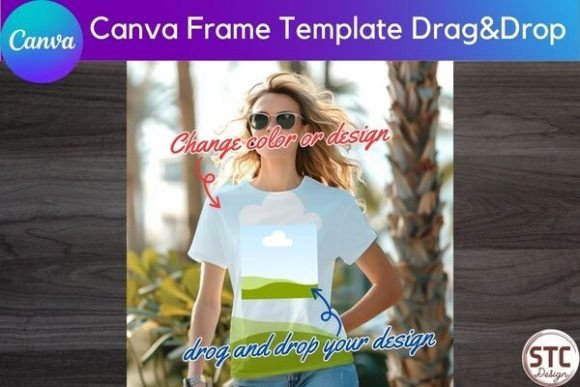
At its core, this digital asset is a smart template designed specifically for Canva, one of the most accessible design tools on the market. Unlike a standard image overlay, the Canva Frame works as a "mask." It allows you to take your specific graphic, logo, or video and drop it directly onto the shirt. The software then automatically handles the perspective, lighting, and cropping, conforming your design to the folds and contours of the fabric. The result is a photorealistic image that looks like it was taken in a studio, rather than a flat graphic pasted onto a rectangle. This distinction is crucial for building a professional brand identity, as customers today are savvy enough to spot low-effort mockups instantly.
Beyond the Flat Lay: Why Visuals Drive Sales
In the crowded landscape of e-commerce and social media, the visual hierarchy of your feed determines your success. A flat design file—no matter how intricate the artwork—often fails to evoke an emotional response. People buy clothes because of how they look on a person, how the fabric drapes, and the lifestyle the garment represents. The Women T-shirt Mockup Canva Frame solves this by providing a realistic context. It moves your design from the realm of "digital file" into the realm of "wearable fashion."
The appeal of this specific mockup lies in its versatility. It serves as a blank canvas that adapts to the personality of the design you place inside it. For a streetwear brand, the frame provides the necessary edge and texture. For a boutique floral shop, the soft lines of the frame can complement delicate artwork. It is a premium font equivalent for the apparel world—it elevates the content it holds. By using these frames, you are effectively utilizing a display font strategy for your clothing; you are presenting your work in a way that demands attention and respects the nuances of the design.
Furthermore, the psychological impact on the buyer cannot be overstated. When a potential customer sees a design on a hanger or a flat surface, they have to imagine the fit. When they see it on a mockup that simulates a real garment, the cognitive load is reduced. They can see the scale of the print and how it interacts with the neckline and sleeves. This clarity builds trust, and trust is the currency of conversion.
Practical Integration: From Concept to Content
One of the most significant advantages of this asset is the ease of use, specifically regarding the drag-and-drop mechanism. For those accustomed to the steep learning curves of Adobe Illustrator or complex 3D rendering software, Canva’s interface is a breath of fresh air. However, it is important to understand the mechanics of the Women T-shirt Mockup Canva Frame to get the best results.
When you open the template, you will encounter a "smart frame." This is not just a layer; it is a container. If you are working with a static image, you simply drag your file from your uploads folder onto the frame. The image snaps into place. However, the real power comes from the editing capabilities. You can double-click the frame to enter the editing mode, allowing you to zoom in on a specific part of your artwork or adjust the rotation to match the angle of the shirt perfectly. This is particularly useful for asymmetrical designs or patterns that need to align with the seams of the garment.
For the modern content creator, the inclusion of video capability is a game-changer. Social media algorithms favor video content, specifically on platforms like Instagram Reels and TikTok. By dropping a video file into the Women T-shirt Mockup Canva Frame, you can create dynamic content where the design moves on the fabric. Imagine a glitch effect, a color-shifting gradient, or a subtle animation playing out on a realistic t-shirt. This kind of social media graphics creation used to require motion graphics expertise; now, it is accessible to anyone with a Canva account.
Strategic Applications for Branding and Marketing
While the immediate application is product visualization, the strategic uses of this template extend much further into your marketing and branding efforts. Consistency is key in web design and editorial design. If you are writing a blog post about your upcoming collection, you need visuals that match the tone of your writing. Using the Canva Frame ensures that every image on your site has a uniform look, contributing to a cohesive brand identity.
Consider the realm of packaging design and inserts. If you are shipping physical products, you might include a postcard or a discount code card featuring a mockup of a future design. This creates anticipation and a sense of exclusivity. Because the frame is a digital download, you can generate these assets on the fly without needing to photograph every single variation of your inventory.
For small business owners and crafters, the ability to test market reaction is invaluable. Before investing hundreds or thousands of dollars into printing inventory, you can use the Women T-shirt Mockup Canva Frame to create "Coming Soon" posts. You can gauge audience engagement based on which designs get the most likes or comments. This data-driven approach to design assets management minimizes risk and maximizes the potential for sales.
It is also worth noting the role of this tool in logo design presentation. If you are a freelance designer pitching a branding package to a clothing client, showing their logo on a realistic t-shirt mockup is far more impressive than showing it on a white background. It demonstrates how the typeface and logo work in a real-world application, adding a layer of professionalism to your pitch.
Maximizing Value and Commercial Use
Understanding the terms of use is critical for any commercial font or asset. The license for this Canva Frame allows for broad commercial application. You are free to use the final images you create—featuring your own designs on the mockup—for selling products, running ads, or publishing content. The restriction is simple and industry-standard: you cannot resell the frame file itself. You cannot take the template and sell it to someone else as a template. This protects the original creator while giving you, the user, the freedom to monetize your creativity.
When evaluating if this asset fits your project, consider your workflow. If you value speed and agility over pixel-perfect control, Canva is the right environment. If you need to adjust the shadows or the lighting of the shirt itself, you might find Canva’s editing capabilities limited compared to Photoshop. However, for 90% of use cases—social media, client presentations, and e-commerce listings—the Women T-shirt Mockup Canva Frame provides more than enough fidelity.
Finally, think about font pairing in a broader sense. Just as you would pair a serif font with a sans serif font for contrast, you should pair your mockup style with your design style. If your artwork is vintage and distressed, a clean, modern mockup frame might create a nice contrast, or it might clash. This particular frame is designed to be neutral enough to support a wide variety of aesthetics, from script font